
Before you start
Open the privacy-request link supplied by the organization and confirm that it is the intended organization. Use an email account you control and provide truthful information. The form includes a penalty-of-perjury attestation. Submit a request only when its statements are true.
Prepare your request
- Review the available request types and choose the one that matches what you want the organization to do. The choices include access, deletion, do not sell, do not share, correction, limiting sensitive-data use, and learning what categories are collected.
- Enter your email address and any relevant optional information requested by the form.
- Explain the request clearly where a description field is provided. Avoid including passwords, payment credentials, or unrelated sensitive information.
- Review the request type and the information you entered.
- Read the attestation in full. Accept it only if it is true and you are authorized to make the request.
If you are not ready to submit, leave the attestation unchecked and do not select Submit request. Review deletion and opt-out requests carefully because they can affect your data or privacy preferences.
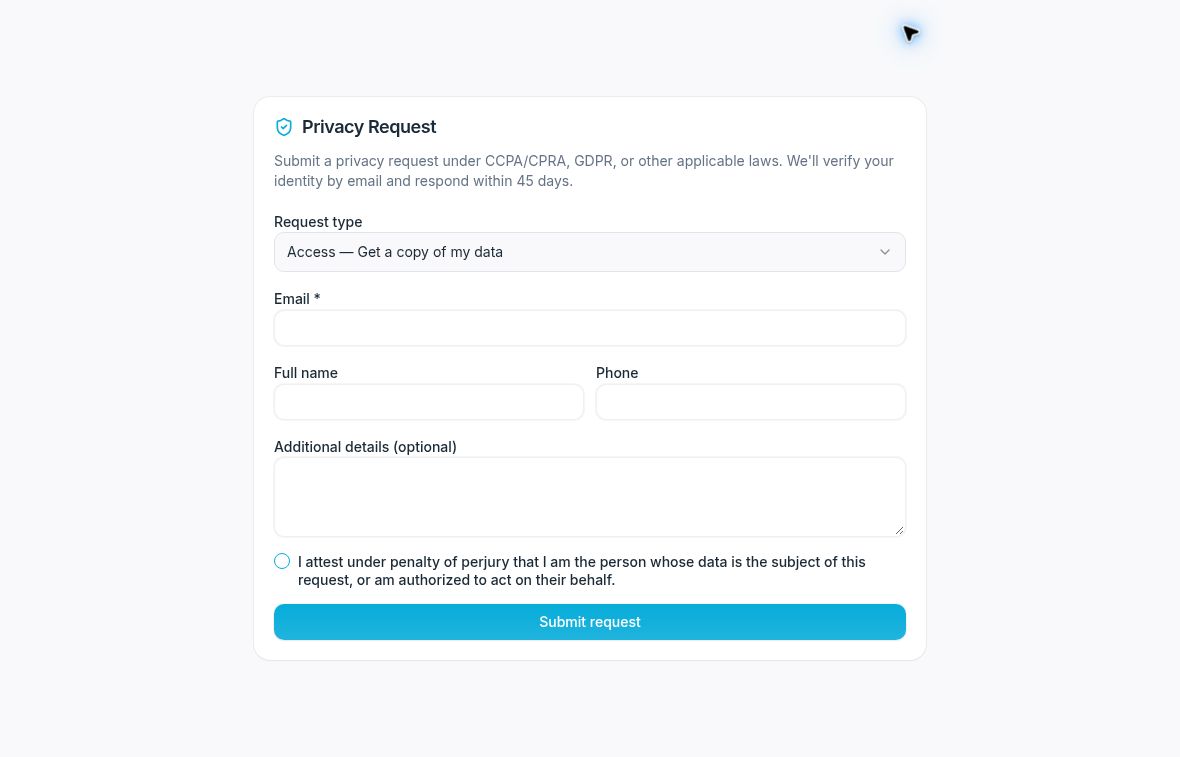
Review your details and the attestation before submitting.
Submit and confirm
- When the request is accurate and ready, select Submit request.
- Follow the check-email instructions shown by the portal.
- Open the matching confirmation email in the mailbox you used for the request.
- If the message includes a confirmation link, open it and review the page.
- Select Confirm my request when you intend to confirm that request. Opening the page alone does not confirm it.
- Read the resulting status or instructions.
Do not share the confirmation link or expose its token in a screenshot. Confirming a request does not by itself establish that the organization has fulfilled it.
If you cannot finish
Check that you used the intended email address and that the confirmation message matches this submission. Follow the portal’s instructions if the link is invalid or expired, or contact the organization through its published privacy contact.
Any confirmation or response periods displayed by the portal describe the app’s workflow. They are not a guarantee that the same legal deadline applies to every request.