
Before you begin
Open the correct organization and use an owner or admin account with billing access. Decide which wallet to fund and how much you are authorized to spend. Review the final checkout total and terms before paying.
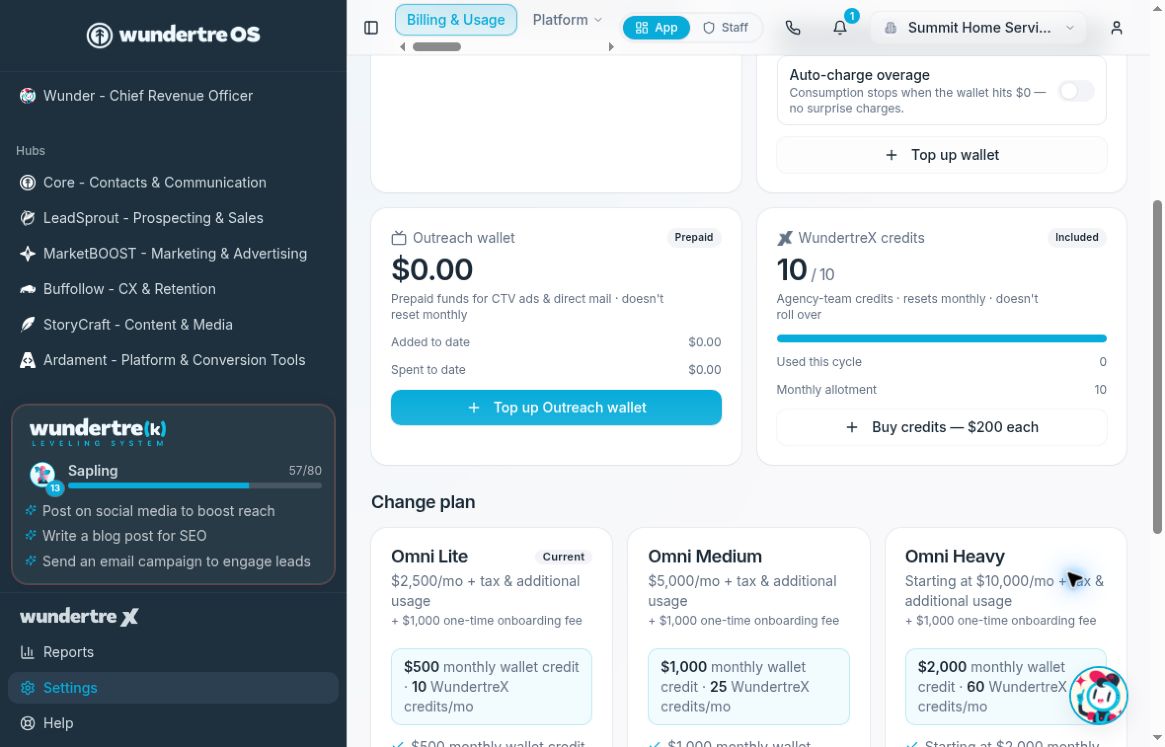
Use the top-up control for the wallet you intend to fund.
Choose a wallet
Open Settings → Billing → Plan & Wallet.
- Consumption wallet funds metered consumption and shows a billing-period reset date when available.
- Outreach wallet funds CTV advertising and direct mail. Its prepaid balance does not reset monthly.
- WundertreX credits, when available, fund agency work. Additional credits apply to the current billing month and do not roll over.
Top up the consumption or Outreach wallet
- Select Top up wallet on the Consumption wallet, or Top up Outreach wallet on the Outreach wallet.
- Confirm that the dialog names the wallet you intend to fund.
- Select a preset amount or enter a custom amount within the displayed limits.
- Review Charge total. Select the Top up button to continue to Stripe. Alternatively, Choose amount on Stripe lets you choose the amount there.
- Review the checkout total, payment method and terms. Complete payment only when all details are correct.
- Return to Billing & Usage and allow the account information to refresh. Check the correct wallet and corresponding billing activity before treating the top-up as complete.
If checkout or the return page is unclear, check the payment result before starting a second purchase.
Buy WundertreX credits
When the WundertreX card is available, use its purchase control to open Buy WundertreX credits. Choose the number of credits and review the displayed per-credit price and total. Complete checkout only after reviewing the current-month and no-rollover terms. After returning, verify the credit balance has refreshed.
Choose consumption overage behavior
On the Consumption wallet, review Auto-charge overage:
- Off means consumption stops when the wallet reaches zero.
- On allows consumption to continue past zero, with overage billed on the next invoice.
Changing the switch saves immediately. Turn it on only if the organization has approved the resulting overage charges. This setting is not an automatic fixed-amount top-up and does not define the Outreach wallet's funding rules.
To verify a change, wait for the setting to refresh and read the explanatory text beside the switch. If an error appears, check the saved state before attempting another change.