
Prepare the receiving endpoint
Use an endpoint controlled by your organization or an explicitly approved service. Prefer HTTPS. Have your developer prepare the endpoint to receive signed JSON requests and validate their signatures.
The signing secret is sensitive. Store it securely and keep it out of screenshots, recordings and support messages. Review the webhook reference linked from the page for payload details and signature verification.
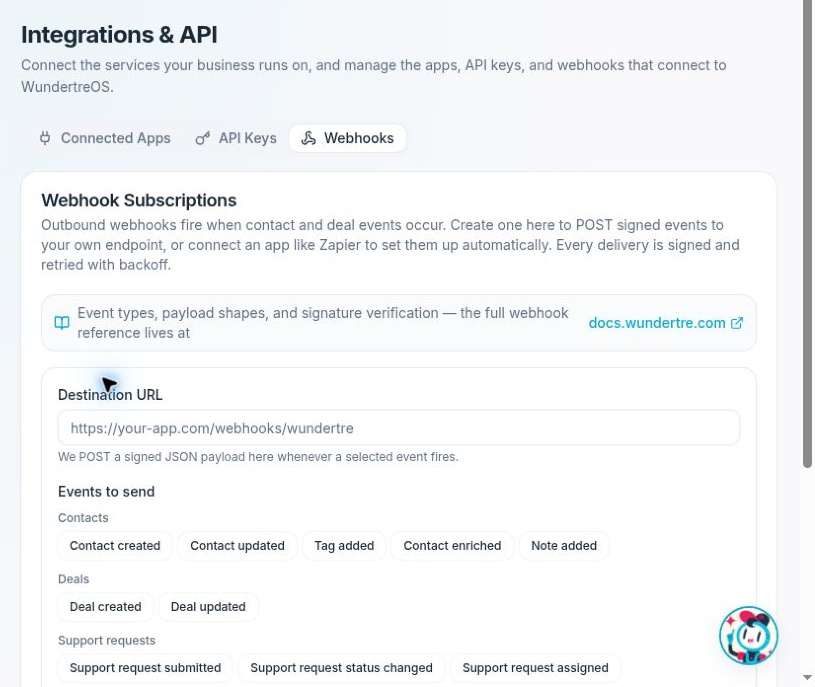
Review Destination URL and Events to send before creating a subscription.
Create a subscription
- Open Settings → Integrations → Webhooks.
- Select New Webhook.
- Enter Destination URL. Double-check the full address and intended recipient.
- Under Events to send, select only the events the receiving service needs. The available groups include Contacts, Deals, Support requests and Social.
- Add an optional Description to explain the subscription's purpose.
- Review the URL and selected events, then select Create webhook when you are ready to establish the subscription.
- If the signing-secret dialog appears, store the secret securely before selecting Done. The dialog says it will not be shown again.
- Check the resulting row's Target URL, Events, Description and Status.
The app requires a valid HTTP or HTTPS URL and at least one event. URL validation alone does not prove that the endpoint belongs to the intended recipient or that delivery works.
Available events
- Contacts: Contact created, Contact updated, Tag added, Contact enriched and Note added.
- Deals: Deal created and Deal updated.
- Support requests: Support request submitted, Support request status changed and Support request assigned.
- Social: Social post failed to publish.
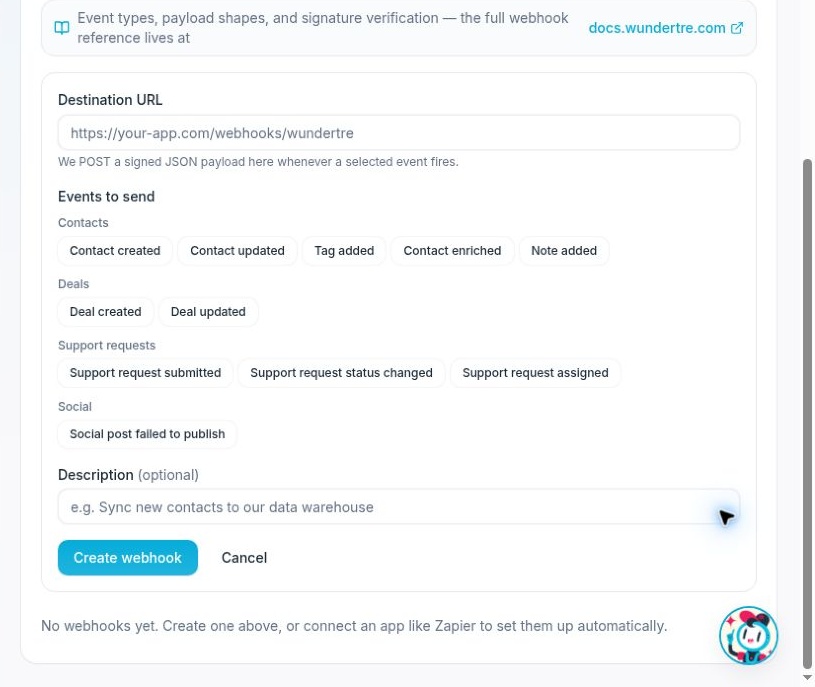
Scroll to review Support requests, Social and the optional Description field.
Verify delivery
The interface describes signed POST requests and retries with backoff. Its signing guidance uses X-Wunder-Signature with an HMAC-SHA256 signature of the request body.
An Active status describes the subscription setting. To verify end-to-end delivery, use an approved test event and have the receiving service check its request and signature-validation logs. Do not create a real customer event solely for testing unless that action is authorized.
Pause or resume a subscription
Select Pause on the intended active subscription. The status changes to Paused after a successful update. Select Resume when you are ready to enable it again.
Pause and Resume save immediately. Before resuming, recheck that the destination and events are still approved. Do not assume paused events will automatically replay; check the current webhook documentation for delivery behavior.
Remove a subscription
Review the exact destination and dependent workflows, then select Delete when removal is intended. This screen does not show a separate confirmation dialog. Wait for the result and check that the row has been removed.
If you only need a temporary stop, use Pause instead. Deleting a subscription removes its configuration; recreating one requires a new setup and secure handling of its signing secret.