
Before you start
Agree on the organization default, any exceptions, and who should approve. Every switch and per-person selection saves immediately, so review the intended change before using a control.
Set the approval workflow
- Open Settings → Social Approvals as an organization admin.
- Review Require approval before posts publish. When this is off, teammates publish directly without this approval workflow.
- To use approvals, turn the control on when your organization is ready.
- Set New and unconfigured teammates need approval. This governs teammates who have no per-person exception.
- Review Approvers can approve their own posts and select the organization’s approved policy.
When approvals are on, posts from teammates who need approval wait in the Social hub’s Approvals queue. Owners and admins always post freely and can approve.
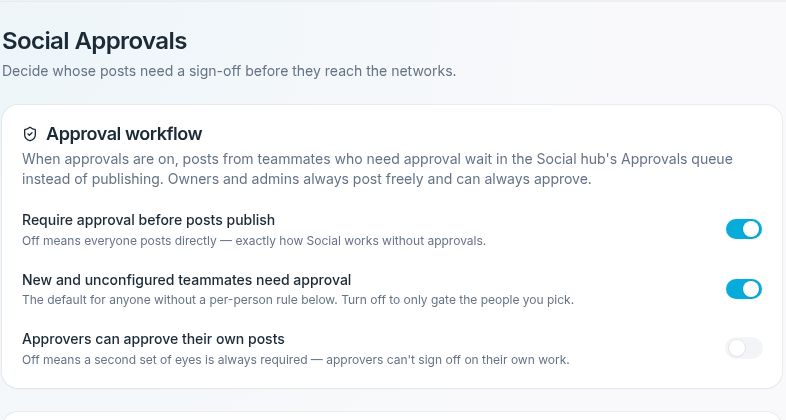
Review all three workflow switches before making changes that save immediately.
Set a per-person rule
- In Per-person rules, locate the correct teammate.
- Choose Org default, Needs approval, or Posts freely.
- Use Can approve only for someone authorized to review posts.
- Wait for the update, then refresh and check the person’s setting.
People marked Can approve also post freely themselves. Granting approval ability therefore changes more than access to the review queue. Owner and admin rows display their existing unrestricted posting and approval status instead of these editable controls.
Check the workflow
Review the organization default and each changed exception. The approval queue is in MarketBoost → Social. Review these settings before your team publishes its next post.
If you cannot edit these settings, ask your organization admin to review the rule you need. If the workflow is off, the additional workflow and per-person controls may not be displayed.