
Before you connect
Confirm the organization and the external account you want to use. Review what data will be shared and what access the integration needs. Use only credentials and accounts you are authorized to connect.
Keep API keys and other credentials out of screenshots, recordings and support messages.
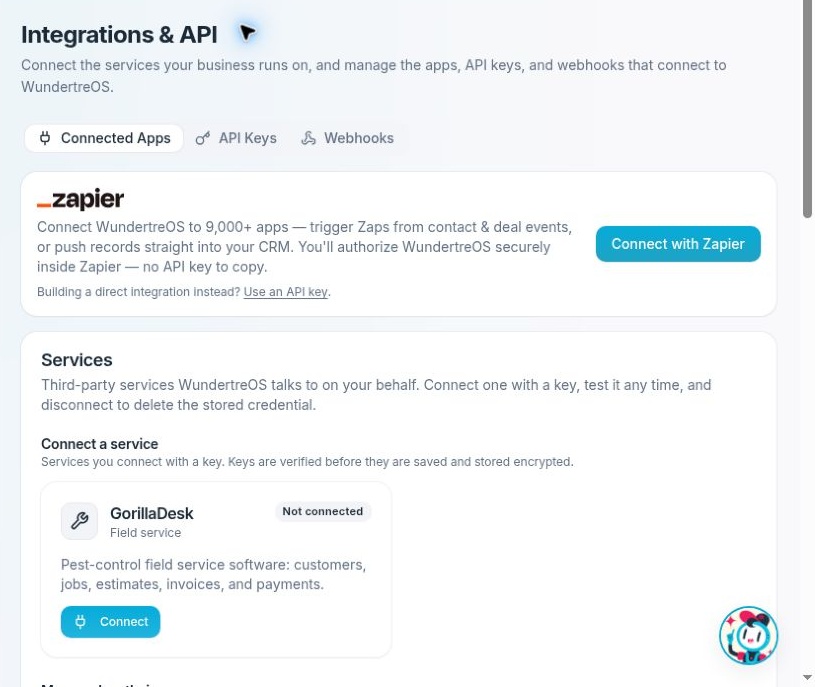
Connected Apps lists service connections and the Zapier authorization entry point.
Find the connection
- Open Settings → Integrations.
- Select Connected Apps.
- Review Services for connections WundertreOS uses on your behalf.
- Review Authorized apps for external apps granted OAuth access to the workspace.
Some service cards provide Manage, which takes you to the feature-specific setup page. Those services are managed from the screens that use them.
Connect a service
For a service with Connect, open its dialog and read the credential instructions. Enter the appropriate service key privately and connect only after reviewing the destination account and access involved.
After connecting, check the account identity, connection state and verification time. If the service supports syncing, also review its sync settings and recent activity. Successful credential verification does not establish that a data sync has completed.
For Connect with Zapier, follow the authorization flow in Zapier. This flow uses OAuth; you do not need to create a direct API key for it. Read the requested permissions before authorizing access.
Verify and review activity
On a connected service, Test checks the connection. Read the resulting status and any error details. Where available, use the activity control to inspect recent sync activity.
For services with Options, review the settings before using Sync now. A dry run can report what a sync would do without writing imported records. Options such as importing inactive customers, syncing financial records or firing workflow triggers can materially change what the integration does. Changes to options can save immediately.
If a service offers Allow writes to that provider, read the stated effects and limits before changing it. This separately controls outbound writes to the provider and saves immediately. Enable it only when those external changes are approved.
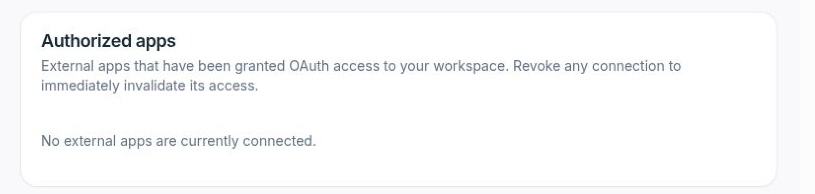
Authorized apps lists external OAuth grants. This example has no connected external apps.
Manage authorized apps
Review the app name, status and granted scopes. Expand the scope chips when more permissions are hidden. Select Revoke only when you intend to invalidate that app's access. Check dependent automations before revoking it.
Disconnect a service
Choose Disconnect on the intended service and read the confirmation. The service dialog explains that disconnecting deletes the stored key and stops syncing while leaving data already in WundertreOS in place. Confirm only when you are ready for that effect.
If an integration fails, check the account identity, verification time, latest error and relevant settings before reconnecting or running another sync. Contact support with sanitized details if the cause is unclear.