
Gather the correct information
Have the organization’s legal business name, valid physical postal address, and intended Default From name ready. Use real, approved information for a live organization. Do not use placeholder addresses in a live organization.
Complete the identifiers
- Open Settings → Messaging Compliance.
- Select CAN-SPAM / Email.
- Find Required identifiers.
- Enter Business legal name.
- Enter Physical postal address, including the details needed to identify the actual mailing location.
- Enter Default From name as your organization wants recipients to see it.
- Review the existing unsubscribe and footer settings below. Preserve your organization’s approved safeguards.
- Select Save CAN-SPAM settings.
- Refresh the page and confirm the identifiers remain correct.
The identifiers are held in the form until you select its Save button. The Reply inbox card on the same tab is a separate configuration.
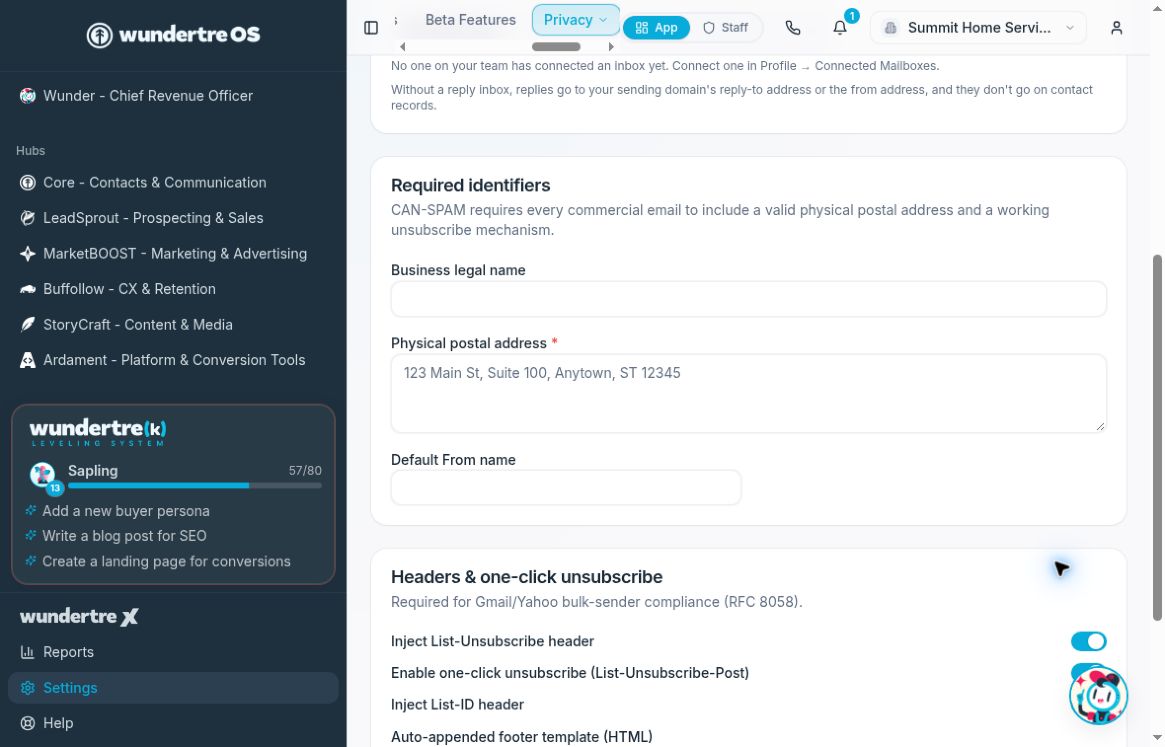
Review the legal business name, postal address, and Default From name.
Understand the badge
The badge checks whether a saved physical address exists. Its disappearance does not verify that the address is correct, that every identifier is complete, that your messages meet every applicable requirement, or that delivery works.
Check the fields themselves after saving. If the badge remains, review any save error and confirm that the address persisted before trying again.
Check the next step
Use your organization’s approved email-review process to inspect sender identity and footer content before a real campaign. Completing these fields does not authorize or send a message, connect a mailbox, or verify a sending domain.